Start Here
Instantly Access All Site Resources
Mobile Message Archiving for Business
Clients won’t stop texting, allow it compliantly
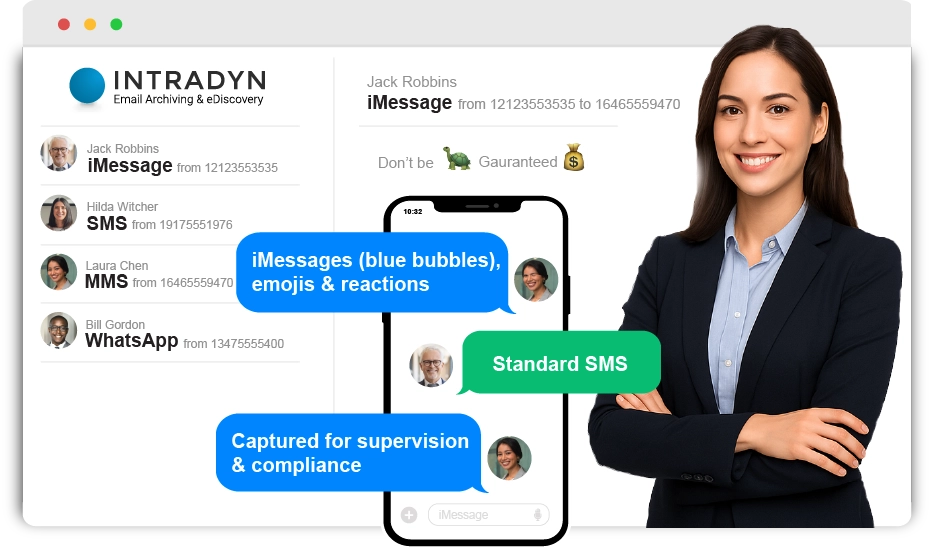
Native imessage, SMS & WhatsAPP ARCHIVING FOR REGULATED BUSINESSES



Clients won’t stop texting. So capture every message,
on every device, without changing how anyone works.


Make Adoption Frictionless
Financial Services
SEC 17a3 | SEC 17a-4 | FINRA | FFIEC | FTC | CFTC
Enterprise/Global
FINRA | SEC | EEOC | MiFID | GDPR
Small RIA/Solo Advisor
FINRA | SEC | EEOC |GDPR
Pick one approach or mix & match – whatever fits your firm’s device policies and employee preference.
- DLA – Native iMessage
- ALA – BYOD/Stipend
- CLA – Carrier Capture
- WAA – WhatsApp
Device Level Archiving (DLA) iMessage
imessage capture
capture from the device
The ONLY solution to capture iMessage + RCS without forcing users to switch apps…100% Native.
Your employees keep using familiar native messaging apps while you securely capture everything—including those encrypted blue bubbles.
- Native iMessage capture — Blue bubbles, reactions, and emojis.
- Carrier Agnostic — Perfect for International teams.
- BYOD & COD support — Corporate & personal devices, zero friction.
- The Advantage: Complete messaging coverage without changing how your team communicates or limiting device choices.
App Level Archiving (ALA) – BYOD
byod app capture
capture from an app (byod)
Keep business and personal completely separate—here’s how…
BYOD’s holy grail: Your team can text clients from their personal phones without risking compliance violations or personal privacy invasion.
- Zero personal exposure — Business texts happen in the secure app only.
- SMS-enable desk phone numbers — Clients text your existing office #.
- No second device required — One phone, two distinct communication channels.
- The Advantage: Perfect compliance isolation while preserving employee privacy and existing client contact methods.
Carrier Level Archiving (CLA)
carrier capture
capture from the carrier (at&t/verizon)
Perfect for firms with corporate owned devices (COD) who want zero employee friction…BUT there’s one catch with iMessage you need to know.
Verizon and AT&T capture every message at the carrier level before it hits employee devices. Zero apps, zero training, zero friction.
- Employees text normally – Native messaging app, using existing number.
- Bulletproof capture — Works even if phones are lost or broken.
- Any device supported — iPhones, Androids, even flip phones.
- The Trade-off: iMessage must be disabled. All business texting happens via standard SMS/MMS (no blue bubbles).
WhatsApp Archiving (WAA)
whatsapp capture
capture from whatsapp/whatsapp business
Clients prefer WhatsApp, but compliance said no. Until now…
Finally say “yes” to Secure Native WhatsApp! Capturing every message, reaction and attachment. Both 1:1 and Group Messages.
- Zero app installation — Regular WhatsApp or WhatsApp Business.
- Supports Business/personal separation — Only work messages get archived.
- Global client communication — Connect internationally how clients prefer.
- The Catch: Since January 2024, WhatsApp only accepts “major carrier cell numbers or landlines” for registration (explore eSIMs)
Easy Onboarding
From zero to fully compliant – remarkably fast
Connect
White Glove Supported Onboarding
Capture
Messages converted to email and pushed to archive
Comply
Review, Search & Produce from one archive
60 Seconds. Three ways to capture texts. Watch closely.
or scroll for solution options and pricing
Want the slow version? Contact the Solutions Team for a live demo.
or Complete Start Here – Instantly Access All Videos & Demos
Testimonials
Trusted by startups and the world’s largest companies
Compliant iMessage & SMS Archiving Pricing
Contact the Solution Team for formal pricing including Enterprise Volume Discounts & Small RIA Pricing
FINRA/SEC Compliant SMS Solution Comparison
| Decision Factors |
Carrier Level (CLA)
Carrier-Direct Capture
|
Device Level (DLA)
iMessage + RCS Capture
|
App Level (ALA)
BYOD Separation
|
WhatsApp
Global Communication
|
|---|---|---|---|---|
| Deployment & User Experience | ||||
| App Installation Required | No Native Apps |
No Native Apps |
Yes Secure Line App |
No Native Apps |
| User Experience Impact | None Native messaging |
None Native messaging |
Minimal Dedicated Secure App |
None Native messaging |
| Compliance & Message Coverage | ||||
| iMessage & RCS Capture | No SMS/MMS only |
Yes iMessage/RCS/SMS/MMS |
No SMS/MMS only |
N/A WhatsApp messages |
| BYOD Support | No Corporate only |
Yes Corporate & BYOD |
Yes BYOD Support |
Yes BYOD Support |
| Business Requirements | ||||
| Keep Existing Numbers | Yes Use Existing Numbers |
Yes Use Existing Numbers |
No Virtual business # |
Yes Use Existing Numbers |
| Global/Multi-Carrier | Limited Select Carriers |
Yes Any carrier/country |
Yes Any carrier/country |
Yes Any carrier/country |
| Best For: |
Corporate devices • Standardized device policies • SMS compliance priority • Zero user training needed |
iMessage users • Mixed device environments • International teams • Comprehensive coverage |
BYOD environments • Privacy conscious firms • Existing office numbers • Complete separation |
Global clients • International communication • WhatsApp preference • Modern messaging |
FAQ’s
Can we keep our numbers? Can we enforce a disclaimer? Phone calls?
Below are the most frequently asked questions around SMS archiving. Being there are multiple approaches, schedule a 15 minute walk through with the Solutions Team who will quickly guide you to the best solution, navigate the nuance and fully answer your questions.
Can we capture iMessage on iPhones?
Yes! Our Device Level Archiving (DLA) solution compliantly captures iMessage & RCS.
OR, for firms who have employees that wish to use iMessage for personal messages our BYOD ALA (App Level Archiving) allows your employees to keep business and personal separate! ALA will never send via iMessage, ensuring all business messages are captured for books and records.
Can we use our existing mobile phone numbers?
Answer: It depends!
For DLA (Device Level Archiving) & CLA (Carrier Level Archiving) YES!!! You will continue to use your existing cell phone numbers.
For ALA (App Level Archiving) you have a few options. With ALA you can issue employees net new “Business Cell Phone” numbers for the ALA App (solution includes new numbers), alternatively, if you want to repurpose your office phone numbers (so you don’t have to update business cards or email signatures) ALA has the ability to peel off the SMS portion of virtually any business phone system number (think MS Teams, RingCentral, Goto Phone, Zoom Phone or any other Cloud Phone system). 90% of new ALA deployments look to use the SMS portion of the business phone number. To use a Cloud Phone System number for SMS we do need to confirm which platform it is on and if peeling off the SMS portion of the number is possible.
My Cloud Phone System (MS Team/RingCentral) has SMS, can we use that number?
For ALA (App Level Archiving) we do support pointing the SMS portion of say a MS Teams, RingCentral or other Cloud Phone System phone number to the ALA App. All voice calls continue to ring to the desk phone/soft phone of your business phone system number but we will peel off the SMS portion of the number (when supported) and point all SMS to the ALA App so you only have to publish one phone number in your email signature or on your business cards and compliantly capture all SMS for Books & Records.
We have an email archive solution, can we push the SMS capture there?
Answer: Yes!
DLA, CLA, ALA and WAA are archive agnostic!
As long as you can provide the “journaling” email for your archive we can push all SMS/Text or WhatsApp message captures to your existing archive so you can repurpose your lexicon and perform supervision from a familiar interface. (**Note, some email archive providers my require you purchase an additional license to reposit your SMS in the archive)
Alternatively, the Intradyn Mobile Message Archive is affordable, quick to deploy and easy to use. Starting at $1,499 per year, including unlimited date forward storage, unlimited support, unlimited exports and a 3rd party letter for the Regulatory Authorities (FINRA/SEC etc), it is as cost effective as it gets.
We supervise a large employee base, do we need to know everyone’s cell phone number?
For all mobile message archiving solutions Intradyn will enrich the message capture with the “Employee Name, Cell Phone Number & Corporate Email” so you will quickly be able to identify the employee side of the conversation and perform supervision on email and SMS in the same search if you leveraging your email archive as a repository for SMS/Text messages.
Every Day Without Capture is Another Day of Exposure…
Before
Unarchived iMessages and WhatsApp conversations silently accumulating compliance risk. Business communication on channels you don’t know about. Employees resisting adoption of clunky third-party apps. Your firm exposed to the same regulatory scrutiny costing the industry billions.
After
Every text message, iMessage, and WhatsApp conversation captured natively and archived automatically, without a single workflow disruption. Real-time channel health monitoring ensuring zero gaps. Full audit-readiness for SEC, FINRA, and state examiners. Peace of mind knowing your compliance posture is airtight.
The cost of compliance? Roughly one-third of an iPhone per user, per year, no minimums, no hidden fees.
FINRA’s 2026 Annual Regulatory Oversight Report names electronic-communications capture and off-channel use as active examination priorities, citing record keeping lapses more than 50 times. The rules have not changed. The best time to close your off-channel gap was years ago. The second-best time is today.
Intradyn is an independent provider of message-archiving and compliance software, offered by Kaizen Ventures Inc., a value-added reseller. Intradyn and its products are not affiliated with, endorsed by, or sponsored by Meta Platforms, Inc., Apple Inc., or any other company named on this page. Product and brand names, including WhatsApp, iMessage, and RCS, appear only to describe the message types Intradyn helps you archive. All trademarks, service marks, and trade names are the property of their respective owners.